Hi, I’m trying to download region segmentations for the Mouse, P56, Sagittal atlas using the Allen image download API . However, the images downloaded via the API seem to have region segmentations at a much lower detail than available on the online viewer (e.g. in attached images- the layers in CTX are not differentiated in the downloaded image/left but can be seen in the online viewer/right). Might there be a way to access the region segmentation data for this atlas at the level of detail seen in the viewer? Would appreciate any pointers. Thanks you!
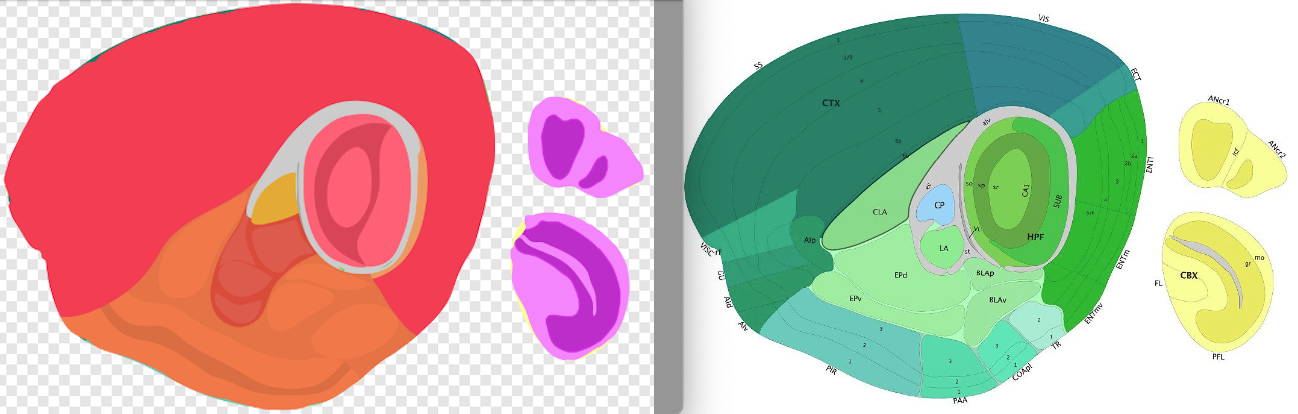
Do you mind sharing the code you used to download the image on the left? That would provide a good starting point for us to figure out how to get you unblocked.
Thanks.
I was able to resolve this and see the region boundaries by just using a different svg viewer (Inkscape instead of Acorn).
Also, adding the code here in case it’s helpful for anyone else:
from allensdk.api.queries.image_download_api import ImageDownloadApi
from allensdk.api.queries.svg_api import SvgApi
from allensdk.config.manifest import Manifest

from allensdk.api.queries.image_download_api import ImageDownloadApi
import pandas as pd

image_api = ImageDownloadApi()
atlas_id = 2  # P56 Mouse Brain Atlas
atlas_image_records = image_api.atlas_image_query(atlas_id)
atlas_image_dataframe = pd.DataFrame(atlas_image_records)

sagittal_ids = atlas_image_dataframe[‘id’].tolist()
sagittal_id = sagittal_ids[0]

downsample = 0  # 0 = full resolution

svg_api = SvgApi()
file_path = f’./{sagittal_id}_svg.svg’
svg_api.download_svg(sagittal_id, file_path=f’{file_path}')
Thanks!
1 Like